
Sora Watermark Remover: 6 Best Free Tools That Actually Work (2026)
March 3, 2026 · 9 min read
You just made something cool with Sora 2, but that cartoon cloud watermark is sitting right in the middle of your video. Every free and standard Sora plan stamps it on your content. A sora watermark remover can strip it out in seconds, and most of the best ones cost nothing.
In this guide, you'll find the six best free tools for the job, how they work, and what to watch out for before you hit "download."
What Is the Sora Watermark (and Why Does It Exist)?
OpenAI adds two layers of identification to every Sora-generated video.
The first is the visible watermark, a small semi-transparent cloud logo that appears on screen. Every Sora user sees this on their exports, unless they pay for the $200/month Pro plan.
The second is C2PA metadata, an invisible cryptographic signature baked into the file. C2PA stands for Coalition for Content Provenance and Authenticity. It's an industry standard that tells anyone checking the file, "This was made by AI."
Here's the catch: OpenAI only embeds C2PA metadata on videos downloaded without the visible watermark. That means free-tier users get the visible logo, and Pro users who skip the logo get the invisible tag instead. Not both at once.
Key takeaway: The visible watermark is what most people want to remove. The invisible C2PA metadata is a separate layer that only applies to Pro-tier downloads.
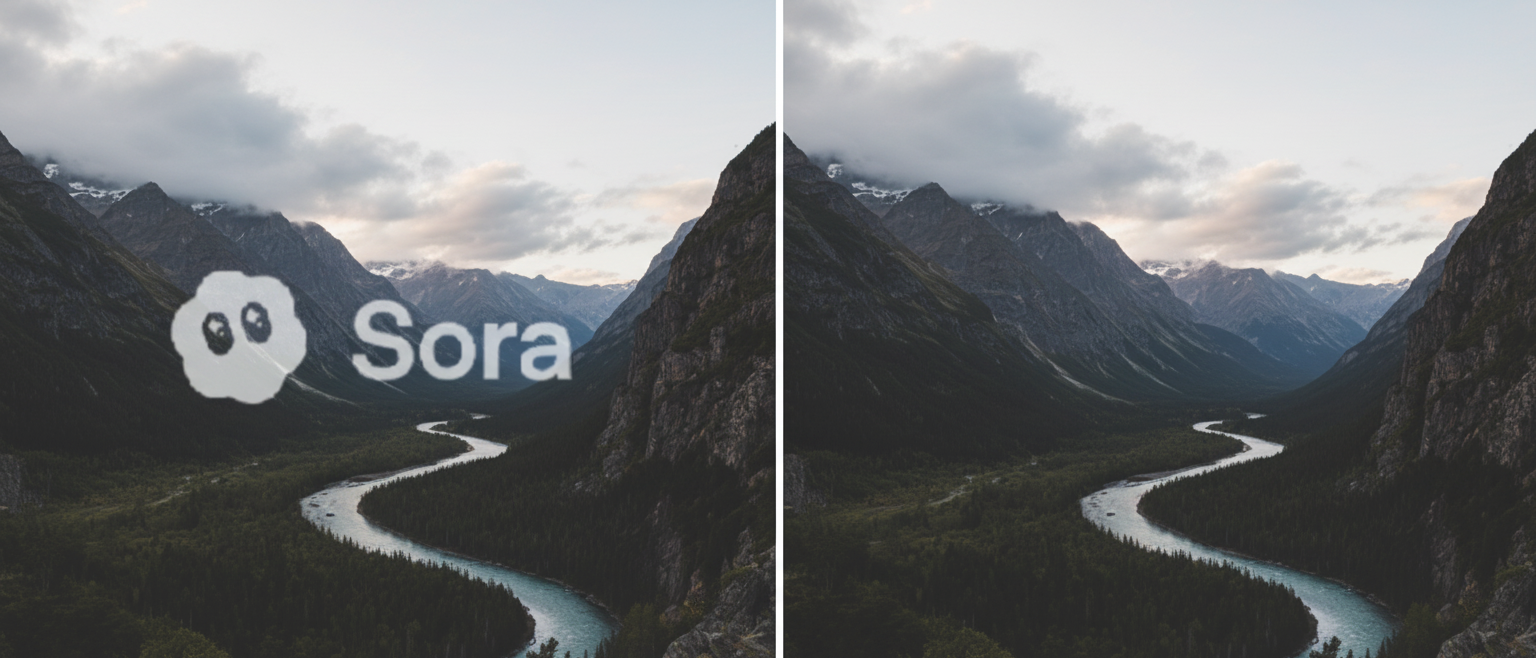
How Sora Watermark Removers Work
Most sora watermark remover online tools use a technique called AI inpainting. Here's the simple version: the tool detects the watermark area, erases it, then reconstructs what should be behind it by analyzing the surrounding pixels and motion across frames.
Think of it like digital patching. The AI looks at colors, textures, and movement around the watermark, then fills in the gap so it looks natural.
Three Common Methods
- AI inpainting is the gold standard. It rebuilds the missing area frame by frame. Results are clean, and most tools use this approach.
- Cropping simply cuts the watermark out of the frame. It works, but you lose part of your video and change the aspect ratio.
- Blur or overlay covers the watermark with a shape, logo, or blur effect. Quick, but it's obvious something was there.
For the best results, you want AI inpainting. Every tool in this guide uses it.
6 Best Free Sora Watermark Remover Tools in 2026
After testing what's out there, these six tools stand out for being free, fast, and actually delivering clean results. None require you to install software.
1. Bylo.ai
Bylo is one of the most searched sora 2 watermark remover tools right now. Upload your video, wait a few seconds, and download the clean version. It uses AI reconstruction to fill in the watermarked area without cropping.
- Price: Free tier available
- Signup required: No
- Best for: Quick one-off removals
- Limits: Free tier has usage caps; paid plans for heavier use
The interface is stripped-down in a good way. You upload, it processes, you download. No distracting upsells or confusing settings.
2. FliFlik
FliFlik runs entirely in your browser and doesn't need a download or account. Paste your video or upload a file, and the tool auto-detects the Sora watermark and removes it.
- Price: Free
- Signup required: No
- Best for: Users who want zero friction
- Limits: Browser-based processing depends on your connection speed
FliFlik is a strong choice if you want to remove sora watermark in seconds without thinking about it. Upload, wait, done.
3. EzRemove.ai
EzRemove does exactly what the name suggests. Upload your Sora video, and within seconds you get a clean version ready for download. No signup, no hidden costs.
- Price: Free
- Signup required: No
- Best for: Fast processing with minimal steps
- Limits: File size and length limits on free tier
The results are solid for standard 1080p Sora outputs. If your video is short (under 20 seconds), this is one of the fastest options.
4. Reel.money
Reel.money gives you 10 free watermark removals per day without even creating an account. Make a free account and that bumps to 20 per day. For most people, 10 is plenty.
- Price: Free (10/day without account, 20/day with free account)
- Signup required: No (optional for higher limit)
- Best for: Batch processing multiple videos
- Limits: Daily cap on free removals
If you're generating several Sora videos a day and need them all cleaned up, the daily allowance here is generous compared to most competitors.
5. BasedLabs
BasedLabs offers a sora watermark remover with motion tracking and mask tools, giving you more control than most one-click solutions. You can adjust exactly what gets removed if the auto-detection isn't perfect.
- Price: Free
- Signup required: No
- Best for: Users who want some manual control over the removal area
- Limits: Export quality may vary on free tier
The mask tools make BasedLabs a good backup if another tool struggles with a tricky watermark placement.
6. Magic Eraser
Magic Eraser supports up to 2K resolution and uses frame-by-frame analysis to remove sora watermark without introducing blur or artifacts. It handles semi-transparent logos well, which is exactly what the Sora watermark is.
- Price: Free (with daily export limits)
- Signup required: No
- Best for: Higher-resolution videos
- Limits: Daily export cap on free version
If you're working with higher-quality Sora outputs or plan to use the video on a large screen, Magic Eraser's resolution support makes it the better pick.
How to Remove a Sora Watermark in Seconds (Step-by-Step)
The process is nearly identical across all the tools above. Here's the general workflow:
Step 1: Get your video file. Download your Sora video from OpenAI. Make sure you have the actual .mp4 file saved to your device. Some tools also accept a direct video URL.
Step 2: Upload to the remover tool. Open any of the tools listed above, click the upload button or drag your file in. Most tools auto-detect the Sora watermark immediately. No manual selection needed.
Step 3: Download the clean version. The AI processes your video in a few seconds to a couple of minutes depending on length. Once done, download the watermark-free .mp4.
That's it. Three steps, usually under 30 seconds for a short clip.
Pro tip: If the result has a slight artifact where the watermark was, try a different tool. Each uses a slightly different AI model, and some handle specific backgrounds better than others.
Things to Know Before You Remove a Sora Watermark
Before you run every video through a remover, here are a few things worth knowing.
OpenAI's Terms of Service
OpenAI's usage policies don't explicitly ban watermark removal from your own generated content. You own the output rights to videos you create with Sora, according to their terms. That said, the watermark exists for content provenance, to help people identify AI-generated media.
Use your judgment. Removing the watermark from your own creative project or portfolio piece is different from removing it to pass off AI content as real footage.
C2PA Metadata Might Still Be There
Removing the visible watermark doesn't necessarily strip the invisible C2PA metadata. Some tools only handle the visual layer. Anyone checking the file's metadata with a C2PA validator could still identify it as AI-generated.
If full provenance removal matters to you, re-encoding the video through a standard editor (like Handbrake or FFmpeg) after removing the visible watermark will strip the metadata. But again, consider whether you actually need to do this.
Legitimate Use Cases
Most people removing Sora watermarks fall into a few categories:
- Content creators using Sora clips in larger projects where a watermark disrupts the visual flow
- Marketers creating ad concepts or mockups with AI video
- Students and researchers using AI-generated footage in presentations
- Portfolio builders showcasing what they can create with AI tools
UC Berkeley professor Hany Farid noted that watermark removers appeared "within hours" of Sora's release, calling the trend predictable. The demand is real and widespread.
Sora Watermark Remover FAQ
Can I remove sora 2 watermark for free?
Yes. Tools like Bylo.ai, FliFlik, EzRemove.ai, and Reel.money all offer free sora 2 watermark remover functionality. Most don't require an account. You upload your video, the AI removes the watermark, and you download the clean file.
Does removing the watermark reduce video quality?
With AI inpainting tools, quality loss is minimal. The AI reconstructs the watermarked area to match the surrounding pixels. You might notice a tiny difference if you zoom in on the exact spot, but at normal playback it's invisible.
Is it legal to remove the Sora watermark?
OpenAI's terms grant you rights to your generated content. Removing the watermark from your own videos isn't explicitly prohibited. However, using watermark-free AI video to deceive people (like faking real footage) could violate other laws and platform policies.
Which sora watermark remover is the fastest?
For speed, EzRemove.ai and FliFlik process short clips in under 10 seconds. Reel.money is also fast and handles batch work well. For longer videos, expect processing times of one to two minutes.
Do these tools work on watermarks from other AI video generators?
Most of these tools are designed specifically for the Sora watermark pattern, but AI inpainting technology works on any visible watermark. Tools like Magic Eraser and BasedLabs can handle watermarks from other platforms too.
Get More Done With Free Online Tools
Removing a Sora watermark takes about 30 seconds with the right tool. The six options above cover every situation, from quick one-click fixes to batch processing and higher-resolution needs.
The bigger picture? You shouldn't have to fight with watermarks, signups, or paywalls just to get simple tasks done. That's the same principle behind everything we build.
Explore the full collection of free tools at allinone.tools and see what else you can knock out in under a minute.
Sources:
- OpenAI Sora launch page - Official Sora product details and watermark information
- UC Berkeley - Hany Farid on Sora watermark removers - Expert analysis on watermark removal trends
- OpenAI C2PA and responsible launch - Details on C2PA metadata and content provenance
- C2PA Steering Committee - OpenAI's involvement in content authenticity standards