
Virtual Dice Roller Guide: Fairness, Uses, and Tools
October 14, 2026 · 19 min read
A realistic 3D dice animation proves nothing about fairness. The generator and the mapping method are the actual evidence, and a virtual dice roller turns a random value into a numbered die face.
The physical d20 has disappeared under the sofa. Someone opens a dice app, taps the screen, and watches a glossy cube bounce across a digital table. Everyone accepts the result because the animation looks convincing, yet the animation could be completely separate from the process that produced the number.
That distinction matters. A roller can be visually polished and still use a flawed range conversion, hide its generator, or make results difficult to review. A plain interface can be more trustworthy if it explains how it produces each face.
This guide looks at the practical questions behind a virtual dice roller: how the mapping works, what standard dice types mean, where Math.random() fits, how to test for bias, and which features help gamers, developers, teachers, and players who use keyboards or screen readers. The useful standard isn't “does it look like a real die?” It's “can you understand and check the method?”
Table of Contents
- Why Your Virtual Dice Roller Might Not Be Fair
- How a Virtual Dice Roller Maps Random Values to Faces
- Pseudorandom Versus Cryptographic Randomness
- How FlipSimu Can Help
- How to Test Whether an Online Dice Roller Is Biased
- Practical Uses Across Gaming, Testing, and Teaching
- Building and Embedding a Simple Dice Roller
- Choosing a Roller You Can Trust
Why Your Virtual Dice Roller Might Not Be Fair
Game night often creates exactly the conditions in which people stop asking technical questions. The group needs a d20, the only physical die rolls under the couch, and somebody opens an app. A few players trust it immediately because the die spins in three dimensions. Others watch the result with suspicion, especially after an unlucky streak.
The animation doesn't settle the argument. A browser can generate the result first and play an animation afterward. The spinning die is presentation, not proof that the underlying value was uniform or that the conversion from a random value to a face was correct.
Practical rule: Judge the number-generation method, not the realism of the graphics.
A fair-looking result also isn't the same as a fair process. If a tool rounds values incorrectly, includes an endpoint it shouldn't include, or reuses hidden state, some outcomes can become more likely than others. An unbiased source can still feed a biased dice pipeline.
What fairness means in practice
For ordinary play, “fair” usually means that every face on a chosen die has the same expected chance over a sufficiently large collection of rolls. That expectation doesn't require every short session to look balanced. Random sequences can contain clusters and apparent streaks, which is one reason players often distrust legitimate random results.
For higher-stakes settings, the question becomes broader:
- Generator identity: Does the tool say whether it uses
Math.random()or a stronger browser interface? - Range reduction: Does it map values into faces without favoring some intervals?
- Transparency: Can players see the die type, modifier, and previous results separately?
- Testing: Has the complete pipeline been checked rather than only the raw generator?
- Accessibility: Can people operate and understand it without animation, color, or a mouse?
These criteria help you evaluate dice for tabletop sessions, classroom experiments, streamed games, and software testing. They also give developers a concrete target when they build their own tool. By the end, you should be able to inspect a roller with evidence instead of relying on reassurance.
How a Virtual Dice Roller Maps Random Values to Faces
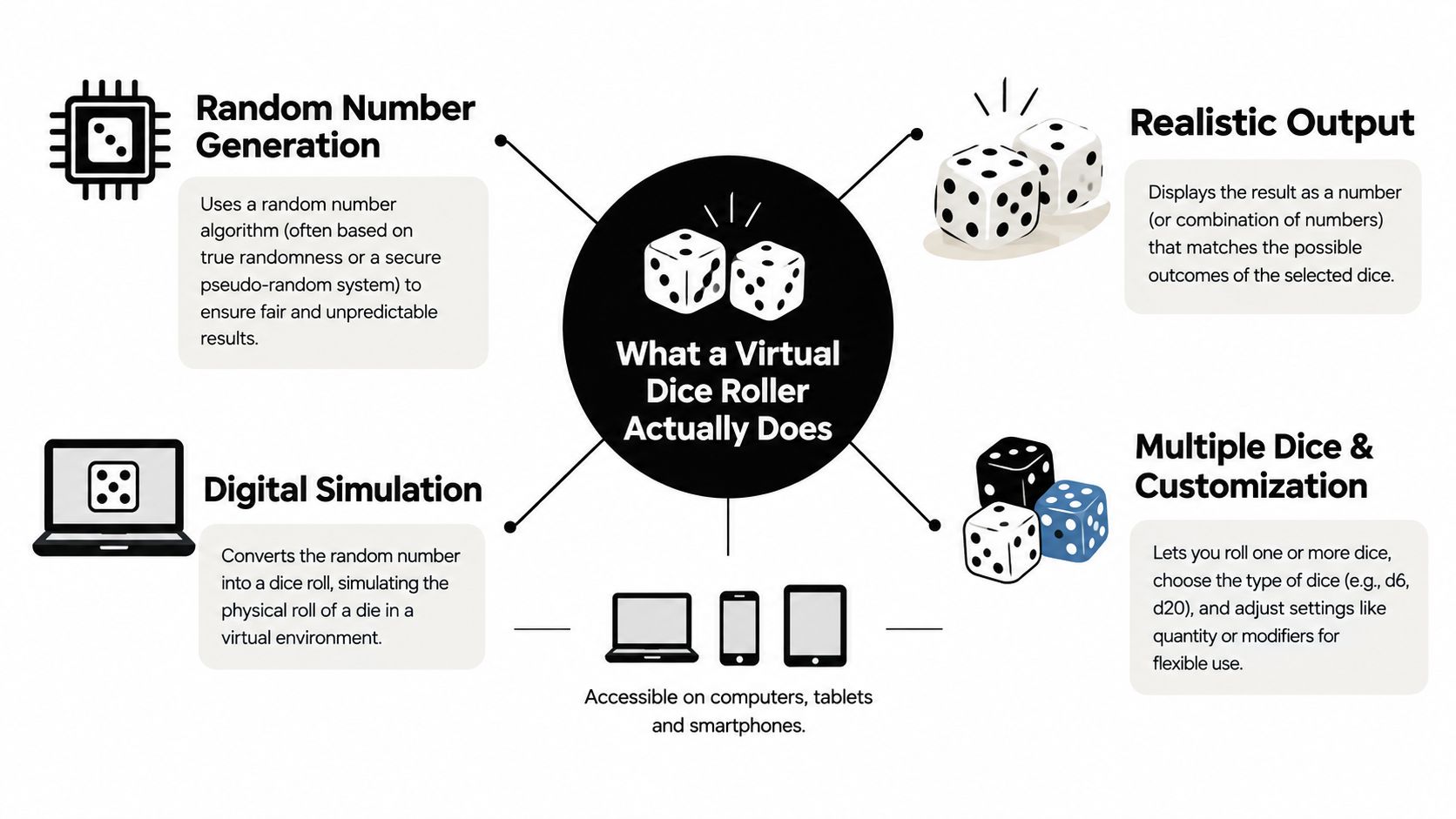
A virtual dice roller does one narrow job: it takes a random-looking value from the browser and maps that value to a numbered face. The animation, sound, and 3D dice are presentation. Fairness depends on the mapping underneath.
The process works like dividing a strip of length 1 into equal bins. If you choose a six-sided die, the strip is split into six equal intervals. If you choose a twenty-sided die, it is split into twenty. A roll lands somewhere on that strip, and the program returns the face for the interval that contains it.
The common formula is:
[ d = \lfloor r \times s \rfloor + 1 ]
Here, (r) is a value from 0 inclusive up to 1 exclusive, (s) is the number of sides, and (d) is the face shown to the user. The floor step removes the decimal portion. Adding 1 shifts the result from zero-based indexing to ordinary dice numbering.
A d6 example
Suppose the browser returns (r = 0.4) for a d6. Multiply by the number of sides:
[ 0.4 \times 6 = 2.4 ]
Apply floor, and you get 2. Add 1, and the displayed result is 3.
That small detail about the range matters. MDN's documentation for Math.random() describes the output as 0 inclusive and 1 exclusive. In plain terms, 0 is allowed, but 1 is not. On a d6, values from 0 up to, but not including, one-sixth map to 1. The next equal interval maps to 2, and the same pattern continues through 6.
That is how a browser roller avoids an off-by-one bug. If 1 were possible, then 1 × 6 would equal 6, floor(6) would stay 6, and adding 1 would produce 7, which is not a valid d6 face. Excluding the upper endpoint keeps the mapping clean.
Common dice and useful controls
The notation is simple: “d” plus the number of sides. A d4 has four faces, a d6 has six, and a d20 has twenty. Common tabletop options include:
- d4, d6, and d8: Useful for damage, movement, supplies, and small random selections.
- d10 and d100: Helpful for percentile tables and probability exercises.
- d12: Common in tabletop role-playing games when a wider damage range is needed.
- d20: Often used for checks, attacks, and saving throws.
A practical roller usually does more than produce one face. It may let you choose how many dice to roll, add a modifier, roll several dice at once, and keep a readable history. Those steps should stay visible. If you roll two d6 and add 3, the tool should show the individual dice and the modifier, not only the final total.
That separation makes fairness easier to inspect and easier to explain. “The roller produced 4 and 2, then added 3” is clearer than “the answer is 9.” It also helps with accessibility and trust. People can review the raw faces, the arithmetic, and the final output as separate parts, which makes errors and disputes much easier to spot.
Pseudorandom Versus Cryptographic Randomness
A fair-looking roll and a hard-to-predict roll are not always the same thing. If you are choosing initiative at game night, one standard is usually enough. If you are running a prize draw, a competitive event, or anything people may want to audit afterward, the bar is higher.
JavaScript's Math.random() is a pseudorandom generator. In plain terms, it behaves like a shuffled deck created by an algorithm. The results usually look irregular to a human, which is why it works well for casual dice rollers, quick classroom demos, and lightweight browser tools. But the sequence still comes from internal state and an implementation-dependent method, so it is not built for security-sensitive use. MDN's documentation explains why Math.random() is unsuitable for cryptographic use.
The Web Crypto API serves a different job. It is the browser's stronger option when unpredictability matters because another person might try to guess, reproduce, or challenge the result. That does not automatically make a dice roller fair, though. The mapping step still matters.
| Aspect | Math.random() |
Web Crypto API |
|---|---|---|
| Ordinary game-night rolls | A practical choice | More protection than most casual games need |
| Predictability concerns | Not suitable where prediction matters | Designed for stronger unpredictability |
| Casual demonstrations | Convenient and simple | Available, but requires more careful range handling |
| Security-sensitive contests | Don't use it | Prefer it with a correct reduction method |
| Range conversion | Use bounded multiplication and flooring | Use rejection sampling to avoid modulo bias |
The modulo trap
Here is the common mistake. A developer gets a random byte, then writes randomByte % s to force it into the number of dice sides. It feels neat, like trimming a larger number down to fit a smaller box. But if the byte range does not divide evenly by the number of sides, some faces get a tiny extra share of outcomes. Over many rolls, that skew can show up.
Rejection sampling fixes this by throwing away the awkward leftover values and using only a range that splits evenly across the faces. It is less flashy than animation, but it is the kind of detail that makes a roller easier to trust and easier to explain to skeptical players or students.
A hash verifies that data stayed unchanged. It is not a randomness source, which this guide to MD5, SHA-1, and SHA-256 covers in detail.
For many tabletop sessions, a clear Math.random() roller is good enough if the tool shows what it did. For contests or reviewable outcomes, use a stronger source, describe the range-reduction method, and keep enough record for someone else to check the process later.
How FlipSimu Can Help
Some people need more than a single number on a blank page. They want a browser tool that supports dice, coin decisions, classroom activities, and reusable presentation settings without forcing them to assemble separate utilities.
FlipSimu's virtual dice roller fits that broader use case. Its dice options cover d4, d6, d8, d10, d12, and d20, while its DnD-oriented roller supports common combinations and additional dice such as a d100. That makes it useful for a tabletop group that needs several familiar formats in one place.
The platform also includes coin-based decision tools, including configurable heads and tails labels, images, colors, backgrounds, flip energy, and sound. Purpose-built variants such as Yes or No Coin, Stay or Go Coin, and 1 or 2 Coin reduce the setup needed for quick binary choices. The Intuition Test and Luck Test add a lightweight way to record guesses or observe streaks.
Where it fits best
FlipSimu is a sensible choice when the experience matters alongside the result. A teacher can use number flashcards or a coin activity, a game master can keep dice and coin tools nearby, and a group can preserve a consistent visual theme across repeated sessions.
Its configuration features support up to three coin styles and a total of up to 20 coins in a session. Accounts can provide three custom color sets, save up to five files, and make configurations available across devices. Global and personal heads-or-tails statistics let users observe outcomes over time, though statistics should be treated as observation rather than proof that a generator is cryptographically secure.

Sharing and embedding support are useful for classrooms, remote groups, and live activities. A direct configuration link can preserve the selected settings, while installation as a desktop or mobile web app can make repeated access more convenient.
The trade-off is that customization and account features aren't the same as fairness evidence. If your main concern is whether a d20 mapping is unbiased, inspect the generator and range reduction. If your concern is quick, reusable, cross-device interaction with dice, coins, flashcards, and shareable settings, FlipSimu is a stronger fit than a bare one-button roller.
How to Test Whether an Online Dice Roller Is Biased
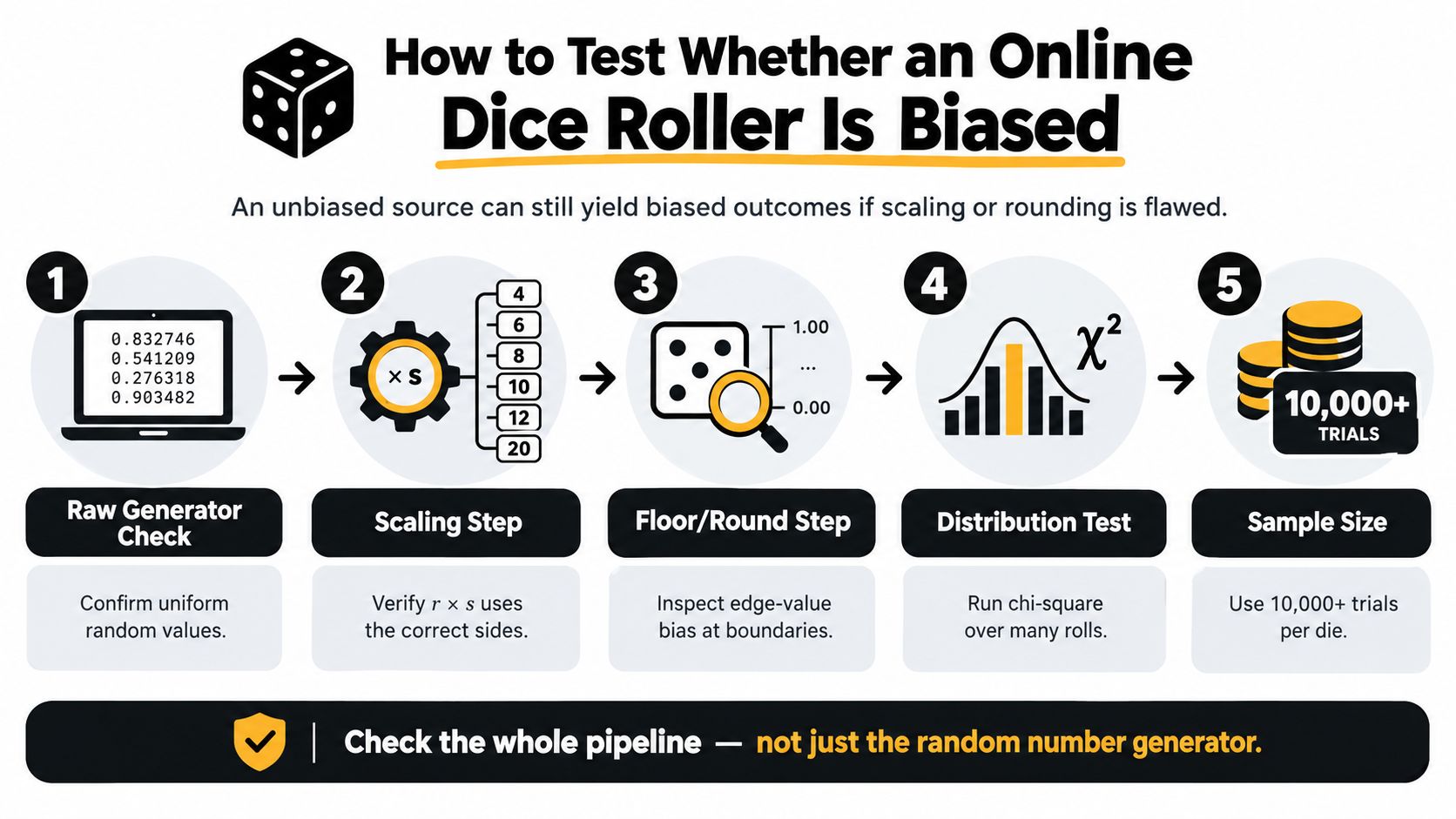
Testing the complete pipeline matters more than inspecting the random source alone. A source can be approximately uniform while a later scaling, rounding, or state-management step gives some faces more opportunities to appear.
Start with the die size. For an s-sided die, the expected proportion for each face is (1/s). A d6 should therefore distribute its outcomes around one equal share per face over a sufficiently large sample, while a d20 should distribute them around one equal share per face for that die.
A practical verification sequence
- Record the setup. Note the die size, algorithm version, browser context, and sample count. Without those details, another person can't reproduce the test.
- Collect outcomes. Save each face rather than only the running average. The full sequence supports distribution and dependence checks.
- Compare observed and expected counts. Look at how often every face occurred against the expected proportion (1/s). Small differences are normal in finite samples, but material deviations deserve investigation.
- Apply a chi-square goodness-of-fit test. This test compares the observed counts with the counts expected from an even distribution. It can identify evidence that the mapping isn't behaving as intended.
- Check order as well as totals. Serial tests and runs tests can reveal dependence between successive rolls even when the overall face counts look acceptable.
NIST SP 800-22 describes a 16-test suite for examining random and pseudorandom binary sequences, including frequency and pattern-based tests. The NIST publication also cautions that passing statistical tests doesn't prove cryptographic security. Its decision procedure uses a 0.01 p-value threshold: a value below 0.01 indicates evidence against the tested randomness assumption.
Edge cases reveal implementation mistakes
A visual review may miss exactly the bugs that matter. During quality assurance, deliberately test values near both boundaries and inspect how the interface handles unusual actions.
- Zero and near-one values: Confirm that the lowest valid value maps to the first face and the highest possible value stays below the invalid upper result.
- Repeated rolls: Check that repeated clicks don't accidentally reuse a stored value or stale component state.
- Multiple dice: Verify that each die receives its own draw and that the displayed total equals the visible components.
- Browser refreshes: Look for unintended state reuse, lost history, or inconsistent initialization after a refresh.
- Modifiers: Keep the raw face values separate from arithmetic adjustments so a modifier can't disguise a mapping problem.
A classroom can use the same method at a simpler level by recording outcomes and comparing the chart with the expected distribution. A tabletop group can use a roll history to investigate a concern without treating one unlucky session as proof of bias. Testing replaces suspicion with a repeatable question: does the implementation produce the distribution its formula promises?
Practical Uses Across Gaming, Testing, and Teaching
The same roller serves different purposes depending on who needs the result and who needs to trust it. A game master may care about speed and a private history. A QA engineer may care about reproducibility and edge cases. A teacher may care about whether every student can operate the interface and inspect the evidence.

Tabletop play
Remote groups can use a d20 for checks, keep results visible in a shared session, and copy a roll into Discord or a stream chat. A game master may prefer a private result for hidden perception checks, while players may want a readable public history for contested actions.
For this setting, prioritize:
- Clear notation: Show the die type, individual faces, and modifier.
- Fast controls: Avoid forcing players through a long animation before every action.
- Shareable output: Make the result easy to copy without losing the underlying arithmetic.
- Optional motion: Let users disable effects without changing the generated result.
The most important social feature is clarity. A short record such as “d20: 14, modifier: +3, total: 17” gives the group something concrete to discuss.
Developer and QA work
Developers can use a roller's mapping logic to generate test inputs, sample values from a list, and explore boundary behavior. A random object selector can support related test scenarios, especially when a test needs varied text rather than numeric faces. The random object generator is one example of that broader pattern.
A good QA workflow separates three questions:
- Did the input parser accept the requested die type and count?
- Did the generator produce a value in the intended range?
- Did the display and arithmetic preserve the result correctly?
The animation belongs at the end, if it belongs at all. Test code should be able to verify the result without depending on timing, visual effects, or a canvas.
A sample taken from a list can also expose issues that ordinary dice miss. Testers should include empty lists, duplicate entries, unusually long text, and repeated selection requests when building adjacent randomization features.
Teaching probability
A class can roll the same die repeatedly, record each face, and compare the observed chart with the expected equal distribution. Students learn an important distinction: a fair process doesn't promise a perfectly balanced short run.
A visible history helps the teacher demonstrate how the same method behaves across repeated trials. A screen-reader announcement, keyboard operation, strong contrast, and results that don't rely on color let more students participate without needing a separate activity.
The strongest classroom setup presents the method plainly. Students can see the die size, the result, and any modifier separately. They can then ask a better question than “did we get an equal number of each face?” They can ask whether the differences are consistent with ordinary variation or large enough to justify testing.
A short demonstration can also show why a realistic animation isn't necessary. Generate the result first, announce it, and treat the visual effect as optional feedback rather than as evidence.
Building and Embedding a Simple Dice Roller
A dependable embedded roller can remain small. Start with three inputs: die type, number of dice, and modifier. Validate that the side count and dice count are sensible, then generate each face independently with the bounded mapping formula.
The program should calculate the result before starting any animation. That order prevents the visual effect from becoming part of the random process and makes the logic easier to test. Display the individual faces, the modifier, and the final total in separate elements.
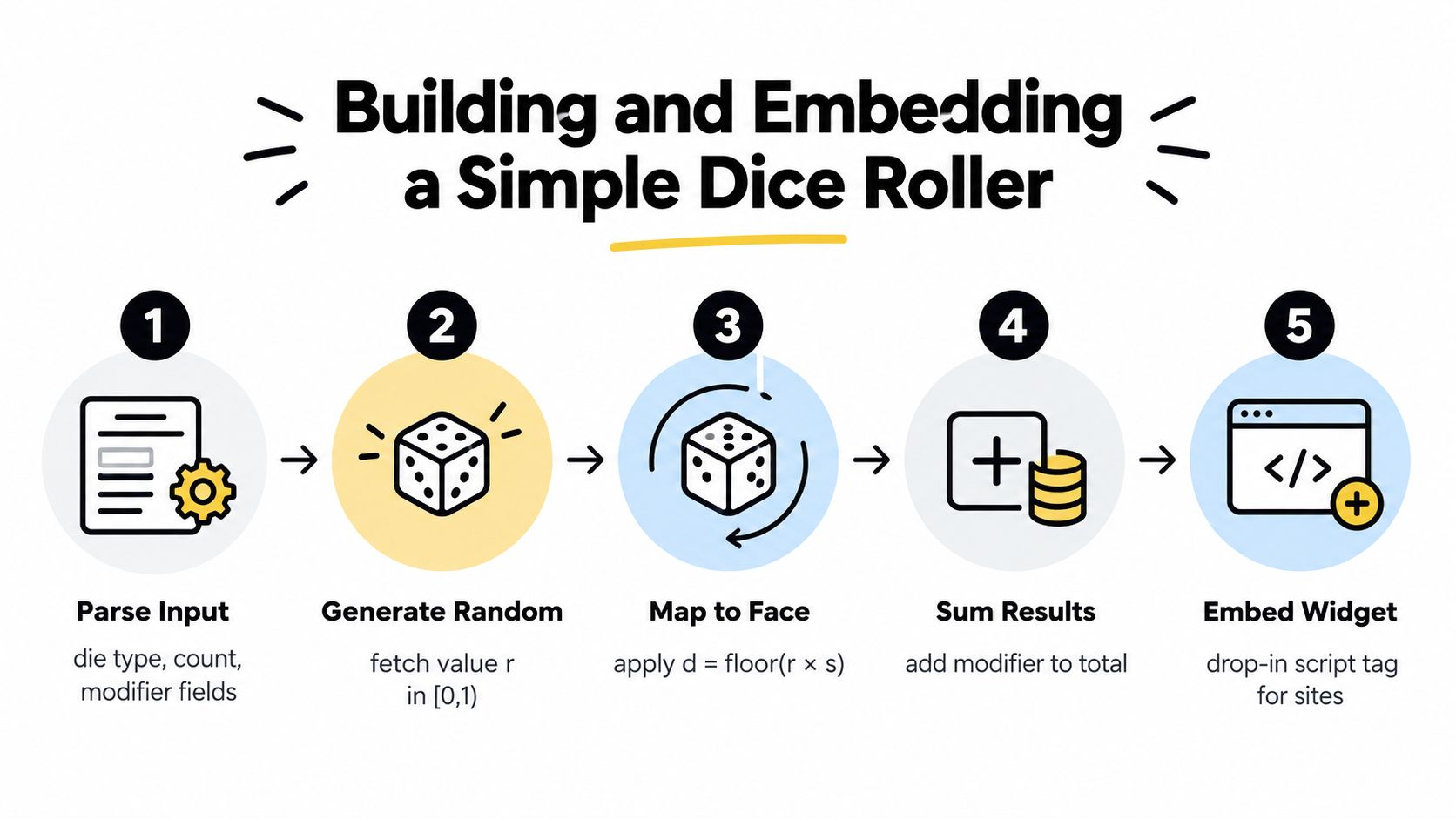
A simple build sequence looks like this:
- Parse input: Read the die type, count, and modifier as controlled values.
- Generate a value: Obtain (r) in the interval from 0 inclusive to 1 exclusive.
- Map the face: Apply (d = \lfloor r \times s \rfloor + 1).
- Sum results: Add the individual faces and then apply the modifier.
- Present the history: Save a readable record of the roll and its components.
If you build related list-based behavior, keep selection logic separate from display logic. A randomize list tool follows the same general principle: generate or select the value first, then render the result.
Build for people, not only browsers
“Works in a browser” doesn't mean everyone can use it. A useful roller should support full keyboard navigation, semantic announcements for screen readers, a reduced-motion preference, large touch targets, and sufficient contrast. Never communicate the result through color alone, because a user may not perceive that color difference or may be using a nonvisual interface.
Keep the history readable on small screens. Avoid requiring a fast gesture, a hover state, or a 3D animation to reveal the number. If the connection is poor, the core roll should remain lightweight, and the interface should explain what happened rather than leaving the user staring at an unfinished effect.
Keep the privacy boundary simple
For casual rolls, process the calculation client-side and require no account or unnecessary data storage. A game-night result doesn't need a profile, email address, or behavioral record.
A transparent, no-account, in-browser roller is usually more useful than a flashy alternative that hides its method behind graphics and tracking. The best interface makes the important evidence visible: the generator choice, the range conversion, the die type, and the roll history.
Choosing a Roller You Can Trust
For most game nights, classrooms, quick decisions, and development checks, choose a roller that loads quickly, works across devices, and explains what it does. You rarely need an elaborate virtual tabletop just to obtain a d6 or d20 result.
The three trust signals are straightforward:
- Named generator: The tool identifies whether it uses a pseudorandom source or a stronger browser randomness interface.
- Unbiased reduction: The conversion from the source range to die faces avoids endpoint errors and, where needed, modulo bias.
- Visible history: The interface records enough detail to distinguish individual faces, modifiers, and totals.
Accessibility belongs on the same checklist. Keyboard support, screen-reader announcements, reduced motion, readable contrast, and results that don't depend on color make the tool usable in more real situations. Privacy matters too. A roller shouldn't need an account or server-side history for an ordinary local game.
Allinone.tools is a fitting low-friction option for readers who want free browser utilities without registration or software installation. Its tools run in modern browsers across desktop and mobile devices, and the publisher describes browser-based processing without storing user data on servers. Details may change, so check the current service information before relying on a specific feature.
You now know more about dice fairness than the average player who just taps “roll.” Choose the method over the animation, inspect the mapping, and use a history that lets players understand what happened.
If you need a quick, transparent tool for your next game, class activity, or test, try the Allinone.tools browser utilities and compare the result display, accessibility controls, and privacy approach with the alternatives you're considering.