
Gemini Watermark Remover
Remove the invisible SynthID watermark from images generated by Google Gemini AI — directly in your browser with 100% privacy. No uploads, no sign-up required.
Loading Watermark Engine...
Simple Process
How to remove the Gemini watermark?
Follow these simple steps to remove the invisible Google SynthID watermark from your AI-generated images.
Upload your image(s)
Drag and drop or select one or more images generated by Google Gemini.
Wait for processing
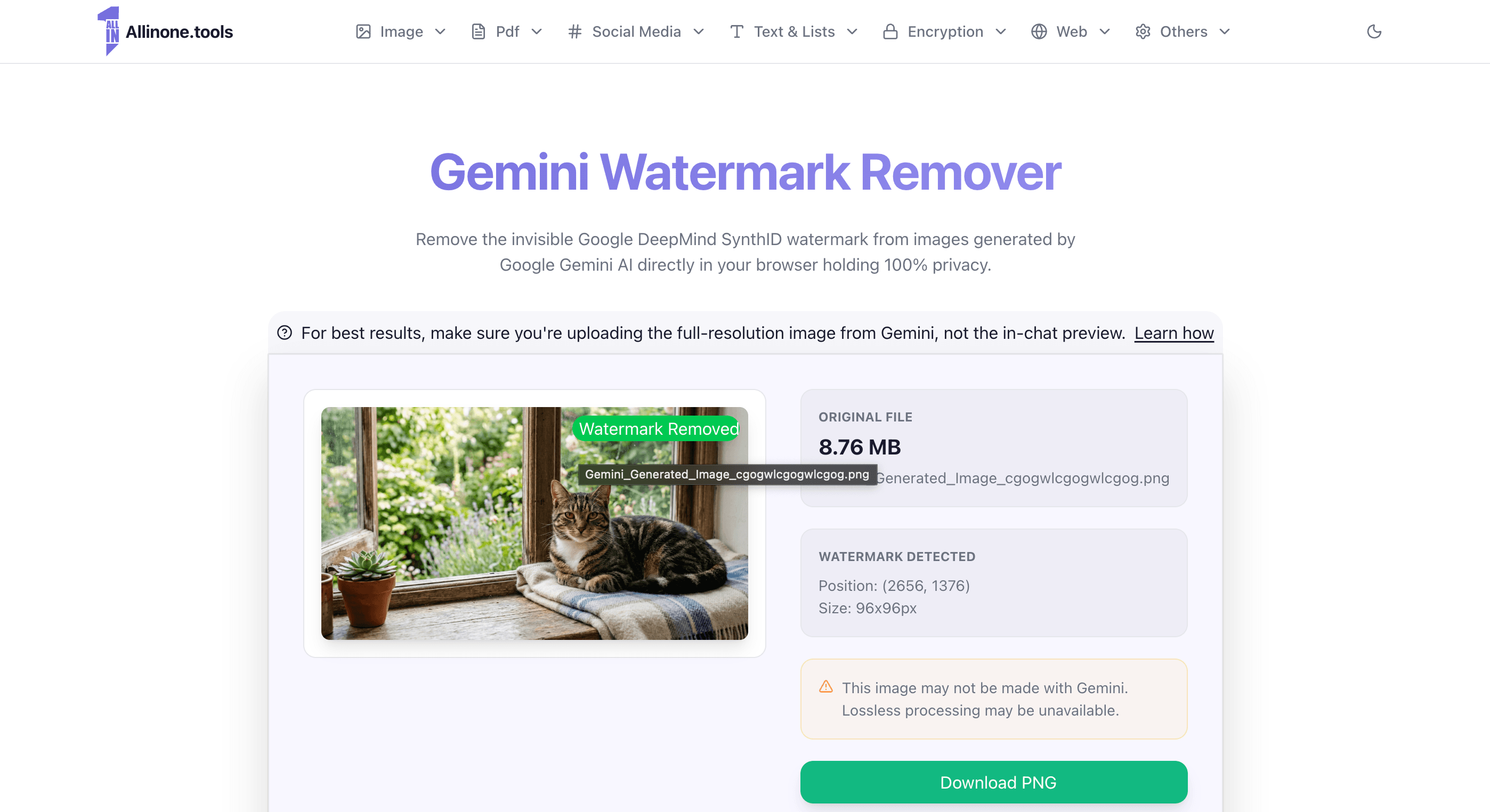
The tool will automatically detect the watermark size and position, then isolate and remove it using reverse alpha blending.
Download result
Once processing is complete, download the individual clean images or download them all at once as a ZIP file.
How to Remove Gemini Watermark from Image
Every image generated by Google Gemini contains an invisible digital watermark called SynthID, embedded by Google DeepMind. While imperceptible to the human eye, this watermark encodes a hidden signal that identifies the image as AI-generated. Our free Gemini watermark remover detects and strips this watermark entirely in your browser — no uploads, no server processing, and 100% private.
To remove Gemini watermark from your image, simply upload the original file above. The tool automatically identifies the SynthID pattern and reverses the encoded pixel changes, restoring the image to its pre-watermarked state.
Why Use This Gemini Watermark Remover?
Unlike other tools that degrade image quality through re-encoding or filters, this Gemini watermark remover performs a mathematically precise reversal of the SynthID embedding process. For original, unmodified images downloaded directly from Gemini, the removal is fully lossless — your image comes out pixel-perfect at full resolution as a PNG.
Completely free with no usage limits
Runs locally in your browser — your images never leave your device
No account or sign-up required
Lossless removal for original Gemini images
Supports JPEG, PNG, and WebP formats
How to Remove Google Gemini Watermark — Step by Step
Removing the Google Gemini watermark takes just a few seconds. The key is making sure you upload the full-resolution original — not the compressed preview shown in the Gemini chat. Here is exactly how to do it:
Click on the image in the Gemini chat to open it
Do not right-click and save directly from the conversation view — that saves the preview, not the full image.

Click the download icon in the top-right corner
This downloads the original image at full resolution with its metadata intact, which is required for lossless watermark removal.

Upload that file to this Gemini watermark remover
The tool detects the Gemini metadata and performs a lossless removal of the SynthID watermark automatically.
Why Didn't the Gemini Watermark Removal Work?
The most common reason the watermark is not fully removed is that the uploaded image is not the original full-resolution file. When you chat with Gemini, the image shown in the conversation is a compressed preview — not the actual generated image. To successfully remove the Gemini watermark, you must upload the original file at its native resolution. Follow the step-by-step guide above to download the correct file.
Other reasons the removal may not work as expected:
The image was re-saved, cropped, or resized after downloading from Gemini
The image was shared through a messaging app that re-compresses files (WhatsApp, Discord, etc.)
The image was not generated by Google Gemini
What Is the SynthID Watermark on Gemini Images?
SynthID is a digital watermarking technology developed by Google DeepMind. It embeds an invisible pattern directly into the pixel data of every image generated by Google Gemini. The watermark is designed to survive common transformations like cropping, resizing, and compression, making it persistent across most image editing workflows. This Gemini watermark remover reverses that embedding process to produce a clean, unwatermarked image.
Supported Formats
You can upload JPEG, PNG, or WebP files to remove the Google Gemini watermark. Since all processing happens locally in your browser, there is no file size limit. The output is always saved as PNG to prevent any re-compression artefacts and ensure the highest possible quality.
Tip: For the best results when you want to remove a Gemini watermark from an image, always download the full-resolution version from the Gemini image viewer — never save the thumbnail directly from the chat.
Image
Image Tools
All the image tools that you need in the same website.
WEBP to JPG
Convert WEBP Image to JPG Online.
Image
PNG to JPG
Convert PNG Image to JPG Online.
Image
PNG to SVG
Convert PNG Image to SVG Online.
Image
JPG to PNG
Convert JPG/JPEG Image to PNG Online.
Image
JPG to SVG
Convert JPG/JPEG Image to SVG Online.
Image
SVG to PNG
Convert SVG Image to PNG Online.
Image
Image cropper
Crop JPG, PNG or GIF by defining a rectangle in pixels. Cut your image online.
Image
Image to BASE64
Easily convert an image to BASE64 format online.
Image
BASE64 to Image
Easily convert BASE64 format to an image online.
Image
Compress an image
Easily reduce the size of an image.
Image
Invert Image Colors
Easily invert the colors of an image online.
Image
Black and White
Easily convert an image to black and white online.
Image
Gemini Watermark Remover
Remove the invisible Google DeepMind SynthID watermark from Gemini generated images.
Image
Pdf Tools
All the pdf tools that you need in the same website.
Protect Pdf
Easily protect a pdf file with a password.
Unlock Pdf
Easily unlocked a pdf protected with a password.
Merge Pdf
Easily merge multiple pdfs into one pdf in the order you want.
Split Pdf
Split a pdf into separate files by page or custom ranges.
Pdf Metadata
Easily preview a pdf's metadata online.
JPG to PDF
Easily convert JPG/JPEG images into a pdf.
mhtml & mht to PDF
Preview a .mhtml or .mht archive and save it as PDF with the browser print dialog.
Text & Lists
Text & Lists Tools
All the Text & Lists tools that you need in the same website.
Bionic Reading Converter
Convert your text to bionic reading in order to read it faster.
Text & Lists
Character Counter
Easily count the number of characters in a text.
Text & Lists
Unicode to Krutidev
Easily convert your text from unicode to krutidev.
Text & Lists
Krutidev to Unicode
Easily convert your text from krutidev to unicode.
Text & Lists
Text to handwriting
Easily count the number of characters in a text.
Text & Lists
Random Object Generator
Generate a list of random objects.
Text & Lists
Numbers to Words Converter
Easily randomize the elements of a list online.
Text & Lists
Credit Card Number Generator
You can get a fake credit card number using our tool for only testing purposes.
Text & Lists
Convert Text to Image
This tool allows you convert a text to an image online.
Text & Lists
Randomize List
Easily convert a number to readable words.
Text & Lists
Reverse List
Easily reverse the elements of a list online.
Text & Lists
Password Generator
Easily generate a secure and random password.
Text & Lists
Repeat Text
Easily repeat a text mutliple times online.
Text & Lists
Ip to Binary
Easily convert ip adresses to binary format.
Text & Lists
ASCII to Text
Easily convert ip adresses to binary format.
Text & Lists
Text to ASCII
Easily convert ip adresses to binary format.
Text & Lists
Text to binary
Easily convert ip adresses to binary format.
Text & Lists
Capitalize Words
Easily convert ip adresses to binary format.
Text & Lists
Lowercase Text
Easily convert ip adresses to binary format.
Text & Lists
Uppercase Text
Easily convert ip adresses to binary format.
Text & Lists
Encryption
Encryption Tools
All the Encryption tools that you need in the same website.
Base64 Encode/Decode
Use this tool to encode/decode base64.
Encryption
MD5 Hash
Use this tool to generate MD5 hashes from text.
Encryption
MD5 Decrypt
Use this tool to decrypt MD5 hashes.
Encryption
SHA1 Hash
Use this tool to generate SHA1 hashes from text.
Encryption
SHA1 Decrypt
Use this tool to decrypt SHA1 hashes.
Encryption
SHA256 Hash
Use this tool to generate SHA256 hashes from text.
Encryption
SHA256 Decrypt
Use this tool to decrypt SHA256 hashes.
Encryption
SHA384 Hash
Use this tool to generate SHA384 hashes from text.
Encryption
SHA384 Decrypt
Use this tool to decrypt SHA384 hashes.
Encryption
SHA512 Hash
Use this tool to generate SHA512 hashes from text.
Encryption
SHA512 Decrypt
Use this tool to decrypt SHA512 hashes.
Encryption
AES Encrypt
Use this tool to generate AES hashes from text.
Encryption
AES Decrypt
Use this tool to decrypt AES hashes.
Encryption
DES Encrypt
Use this tool to generate DES hashes from text.
Encryption
DES Decrypt
Use this tool to decrypt DES hashes.
Encryption
RIPEMD160 Encrypt
Use this tool to generate RIPEMD160 hashes from text.
Encryption
URL Encode
Url Encode is a tool that allows you to encode URL parameters to send data to server.
Encryption
URL Decode
Url Encode is a tool that allows you to decode URL parameters to Plain and readable text.
Encryption
HTML Encode
Html Encode is a tool that allows you to encode plain HTML to encoded html.
Encryption
HTML Decode
Html Decode is a tool that allows you to decode html into plain HTML.
Encryption
Web
Web Tools
All the Web tools that you need in the same website.
CSS Minify
Easily minify and compress css code.
Web
CSS Beautify
CSS Beautify allows you to transform your messy and minified CSS to a clean CSS.
Web
HTML Beautify
Easily beautify your html code.
Web
JS Beautify
Easily beautify your js code.
Web
JSON to XML
Use this tool in order to easily convert from JSON to XML format.
Web
JSON Minify
Use JSON Minify tool in order to minify JSON, compact JSON and compress JSON.
Web
JSON Beautify
Use JSON Minify tool in order to auto format and beautify JSON format.
Web
JSON Viewer
JSON Viewer allows you to convert raw JSON data into JSON View Tree.
Web
HEX/RGB Converter
Easily convert hex/rgb to rgb/hex.
Web
Terms Generator
Easily generate terms & conditions for your website.
Web
Privacy Policy Generator
Easily generate privacy policy for your website.
Web
Others
Others Tools
All the tools that you need in the same website.
Why Allinone.Tools
Advantages
We believe the best tools should be free, fast, and secure

Totally free to use
We believe that out tools should be free to use for everyone, because these tools were created by developers for developers.

Do more with less
All the tools in one place, with a simple and intuitive UI makes it easy to find what you need. Everything is instantly available at your fingertips.

Compatible with all devices
All-in-one is a browser-based application that works on any platform. No software needs to be downloaded or installed.
Social Media
Social Media Tools
All the Social Media tools that you need in the same website.
Thumbnail Grabber
Easily download thumbnail images from a youtube video.
Social Media
Tweet generator
Easily generate believable fake tweets and download them as images.
Social Media
Line Sticker Downloader
Easily download Stickers from Line.
Social Media
New
X Image Slicer
Slice your image into multiple parts tailored for X.com posts.
Social Media
Instagram Post Generator
Easily generate believable fake tweets and download them as images.
Social Media
Youtube Trending Videos
View all the trending videos in worldwide youtube.
Social Media
Youtube Tags Extractor
This tool allows you to extract tags from a youtube video.
Social Media